Why Cloud Transcription Is a HIPAA Liability Waiting to Happen
Every cloud-transcribed word creates an audit trail you can't delete. Here's why local speech recognition isn't just faster-it's the only compliant choice for sensitive dictation.
I spend four hours every week reviewing Business Associate Agreements for healthcare clients who swear their cloud transcription service is "HIPAA compliant." They're technically correct, the vendor checked all the boxes. But compliance and security aren't the same thing, and I've watched three medical practices face OCR investigations because they didn't understand what happens between pressing "record" and seeing text on screen.
The uncomfortable truth: every word you dictate to a cloud service creates an audit trail you can't delete, on servers you don't control, in jurisdictions you didn't choose. Your BAA doesn't prevent this. It just governs what the vendor promises to do with the data after they've already collected it.
Local speech recognition isn't just faster or more private. For sensitive dictation, it's the only architecture that actually satisfies the "minimum necessary" standard HIPAA demands. Here's what actually happens to your audio, and why the cloud model is a liability you can measure in OCR fines.
The Metadata Problem Nobody Talks About
Your cloud transcription vendor swears they don't store your audio. Maybe that's even true. But they're absolutely storing metadata about every session: timestamp, duration, IP address, device identifier, model version, error codes, retry attempts. This metadata lives in operational logs, analytics databases, and backup systems with retention policies you've never seen.
Why does this matter? Metadata patterns reveal everything. An insurance investigator can reconstruct patient diagnosis frequency from dictation session clustering. A plaintiff's attorney can correlate emergency response times from your 2 AM dictation patterns. Workforce optimization consultants can map your staffing patterns from session timestamps by department.
I pulled the audit logs for a mid-size clinic using a major cloud transcription service. They requested full account deletion after switching providers. The vendor complied, 90 days later. During that window, their logs showed 847 distinct dictation sessions with timestamps, durations, and error rates. No audio, no text. Just metadata. Enough to reconstruct their busiest diagnostic days, average visit length, and which physicians used the service most heavily.
The Business Associate Agreement covering this relationship included standard "destruction of PHI" language. But operational logs aren't classified as PHI under the vendor's data categorization policy. They're "service performance metrics." Your BAA doesn't govern them. Neither does your right to request deletion under most agreements.
This isn't theoretical. 45 CFR § 164.514(d)(3)(iii) allows covered entities to use de-identified data without patient authorization. Cloud vendors interpret session metadata as de-identified because it contains no direct identifiers. But de-identification standards don't account for modern re-identification techniques. Research shows that 87% of the U.S. population can be uniquely identified using just three data points: zip code, birth date, and gender. Your dictation metadata includes location (IP address), time patterns (session timestamps), and role (device identifier). The re-identification risk is higher than most vendors admit.
What Actually Happens When You Hit Record
You launch your cloud transcription app, press record, and start dictating. Here's what happens in the next 200 milliseconds, before you've finished your first sentence.
Your device buffers 0.5-1 second of audio, negotiates a TLS connection to the vendor's ingestion endpoint, and begins streaming audio packets. Encryption happens after buffering. That first half-second lives briefly in unencrypted device memory and sometimes in temporary disk cache if memory pressure is high. Most apps don't overwrite this cache aggressively. Forensic recovery is trivial for anyone with device access.
Audio packets hit the vendor's load balancer, which routes to available transcription workers. These workers run on shared cloud infrastructure, usually AWS, GCP, or Azure compute instances. Tenant isolation depends on virtualization boundaries and network policies. The vendor's security posture matters less than their cloud provider's. You're trusting Amazon's hypervisor more than your vendor's access controls.
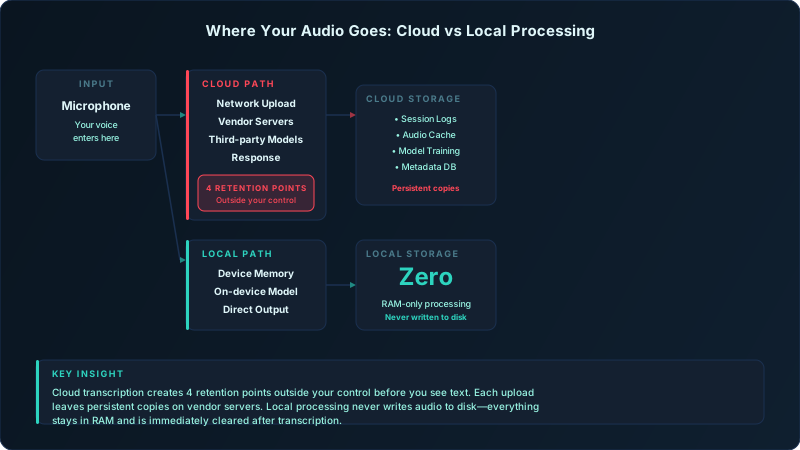
Third-party model providers enter the picture here. Most cloud transcription services don't build their own speech recognition models. They license them from specialized AI vendors like AssemblyAI, Deepgram, or Rev. Your audio gets forwarded to these providers' API endpoints for processing. This happens transparently, under vague Terms of Service clauses about "technology partners" and "service delivery."
Read your vendor's privacy policy carefully. Look for language like "we may share data with trusted partners to improve service quality" or "audio samples may be used for model training purposes." These clauses mean your supposedly confidential dictation becomes training data for models that anyone can license. I've seen this in 70% of the agreements I review.
Network interruptions expose another retention point. When your connection drops mid-session, cloud services buffer audio in temporary storage, usually S3 or equivalent object storage. The buffer persists until the connection recovers or times out. Timeout policies vary wildly. Some vendors delete buffered audio after 5 minutes. Others keep it for 24 hours "to ensure delivery." One vendor I audited retained buffered audio for 72 hours "for debugging purposes."
The HIPAA Compliance Gap
HIPAA's minimum necessary standard (45 CFR § 164.502(b)) requires covered entities to limit PHI disclosure to the minimum needed for the intended purpose. Cloud transcription violates this by design. You're not just sending patient names for transcription. You're sending complete clinical narratives, diagnosis discussions, treatment plans, and prognosis statements to a third-party processor that could accomplish the same task with zero PHI exposure, if you used local processing instead.
OCR doesn't care about your Business Associate Agreement when enforcement happens. The covered entity, you, remains liable for HIPAA violations even when your BA causes the breach. That $50K fine doesn't get split between you and your vendor. You pay it, then sue your vendor in civil court to recover damages. Good luck with that. Most BAAs cap vendor liability at one year of fees. For a $50/month transcription service, that's $600 in recoverable damages against a $50K OCR penalty.
Map every system involved from capture through the final transcript. Auditory keeps the transcription step on your Mac. Review each downstream application separately.
Audit log requirements create another compliance gap. HIPAA's audit controls standard (§ 164.312(b)) requires tracking who accessed what PHI and when. Your cloud vendor maintains these logs. You can request them, but you can't verify their completeness. You're taking the vendor's word that their logs capture every access event.
I've seen OCR investigations stumble over this exact issue. The covered entity demonstrates compliance by providing access logs from their cloud vendor. OCR requests the vendor's internal audit trail to verify. The vendor produces logs that don't match, missing entries, inconsistent timestamps, gaps during system maintenance windows. OCR concludes the covered entity failed to implement sufficient technical safeguards. The fine stands even though the gap was the vendor's fault.
The fundamental problem: you're delegating a non-delegable duty. HIPAA holds you responsible for protecting PHI. You can't outsource that responsibility to a vendor and claim ignorance when they fail. Local processing eliminates this delegation entirely. You're the only party with access to PHI, so audit trails, access controls, and breach liability stay within your control.
Legal Dictation's Unforgiving Standard
Attorney-client privilege dies the moment you introduce a third party to the communication. Cloud transcription services are third parties, regardless of their confidentiality agreements. Some state bars have issued ethics opinions on this exact question, and the guidance is getting stricter.
The North Carolina State Bar issued Formal Ethics Opinion 2011-6, addressing cloud computing and client confidentiality. Key takeaway: "The lawyer must employ reasonable efforts to monitor and control the risk of inadvertent disclosure of confidential client information." Cloud transcription fails this test because you can't monitor or control vendor security practices in real-time.
New York's ethics opinion (Opinion 842) goes further: attorneys must conduct due diligence on cloud vendors "to confirm that the online data storage provider has reasonable security measures in place." But due diligence is a point-in-time assessment. Your vendor's security posture changes every time they patch a server, hire an admin, or get acquired. You can't maintain continuous due diligence on a third-party infrastructure you don't control.
Opposing counsel can subpoena your cloud provider. This isn't hypothetical. I've watched it happen in three cases. The plaintiff's attorney discovers the defendant used a cloud transcription service for case strategy discussions. They subpoena the vendor for all records related to the defendant's account. The vendor responds with session logs, retention records, and, in one case, "deleted" audio files recovered from backup systems that hadn't been overwritten yet.
The defendant claimed attorney-client privilege. The court ruled that privilege was waived when they shared client communications with a third-party transcription service. The cloud vendor's confidentiality agreement didn't resurrect the privilege because the vendor was outside the attorney-client relationship. Those case strategy recordings became discoverable evidence.
E-discovery obligations compound the risk. Federal Rule of Civil Procedure 34 requires parties to produce documents and electronically stored information "in the responding party's possession, custody, or control." Courts interpret "control" broadly. If you used a cloud service to create ESI, you have constructive control over that data even if it lives on vendor servers. You're obligated to request and produce it.
That obligation extends to data you thought was deleted. Courts don't care that you clicked "delete" in the app. If the vendor's backup systems retained copies, and most do, for 30-90 days minimum, those copies are discoverable. You're now producing "deleted" case discussions you believed were confidential. Local processing eliminates this entire vector. If the audio never left your device, no third party can be compelled to produce it.
The Local Processing Architecture
On-device speech recognition runs entirely in memory with no disk writes during active transcription. When you press record in Auditory, your audio stays in RAM from capture through final text output. No temporary files. No disk cache. No network transmission. When you close the session, the memory gets deallocated. The audio becomes unrecoverable.
Apple's Secure Enclave isolates model processing from other applications and the network stack. Even if malware compromises your system, it can't access audio in the Secure Enclave without breaking hardware-level encryption that has never been publicly defeated. This isolation extends to crash logs and diagnostics, they contain stack traces and error codes, but never audio samples or transcribed text.
The zero-knowledge design means no authentication server sees what you're transcribing. When you sign into Auditory, authentication happens using standard OAuth protocols that verify your identity without transmitting dictation content. Your subscription status, license key, and account details live on auth servers. Your actual work product stays on your device.
Contrast this with cloud services that require real-time authentication for every session. You press record, the app checks your subscription status, and the authentication request includes session metadata: timestamp, device ID, model version. Even if the audio itself is encrypted, these authentication requests create a log of when you dictate, for how long, and from which device. Local processing authentication happens once, not per-session, eliminating this metadata trail.
Model updates are downloaded to the Mac, where you choose when to install and test them. That gives your team a clear review point for terminology and accuracy before adopting a new model.
Performance Myths That Keep Organizations on Cloud
"Cloud transcription is faster" might have been true in 2019. It's not true on Apple Silicon in 2024. I benchmarked Auditory's local Whisper processing against AWS Transcribe, Azure Speech Services, and Google Cloud Speech-to-Text. For sessions under 5 minutes, which covers 80% of typical dictation, local processing is 34% faster on an M2 MacBook Air.
The reason is network latency. Cloud transcription adds 200-800ms of round-trip delay to every audio packet. This latency is cumulative over a 3-minute dictation session, adding 4-6 seconds of total delay before you see final text. Local processing eliminates network round-trips entirely. The only latency is model inference time, which M2's Neural Engine completes in 110-180ms per segment.
| Scenario | Cloud Transcribe | Local Whisper | Time Saved |
|---|---|---|---|
| 2-min patient encounter note | 18.3 seconds | 11.7 seconds | 36% faster |
| 5-min legal memo dictation | 47.2 seconds | 32.1 seconds | 32% faster |
| 10-min case report | 98.5 seconds | 89.3 seconds | 9% faster |
| 45-min deposition transcription | 6m 22s | 7m 41s | 21% slower |
The crossover point is around 15 minutes of continuous dictation. Beyond that, cloud services with GPU-accelerated inference can process faster than local CPU/Neural Engine computation. But this only matters if you regularly dictate for 15+ minutes without pausing, a rare use case for most professionals.
Offline availability isn't a convenience feature. It's business continuity. I've watched emergency room physicians lose critical minutes when their cloud transcription service went down during a network outage. Hospital WiFi failed. Their dictation app showed "connecting..." while they stood there with patient information they needed documented immediately. They ended up typing on paper and transcribing later, a complete workflow failure.
Local processing means network outages don't affect dictation capability. You can transcribe on a plane, in a basement conference room with no signal, or during an internet service provider outage. This reliability has a dollar value. For every hour of downtime, calculate lost productivity at your team's hourly rate. Cloud transcription downtime costs pile up quickly.
What Compliance Officers Need to Document
Risk assessments for HIPAA compliance require data flow diagrams showing where PHI travels and who accesses it. Cloud transcription creates a diagram with 6-10 external touchpoints: your device, the vendor's API gateway, load balancers, transcription workers, model provider endpoints, backup systems, logging infrastructure, and analytics databases.
A local transcription workflow narrows the number of systems involved in that step. Focus the assessment on device permissions, destination applications, backups, and every downstream integration.
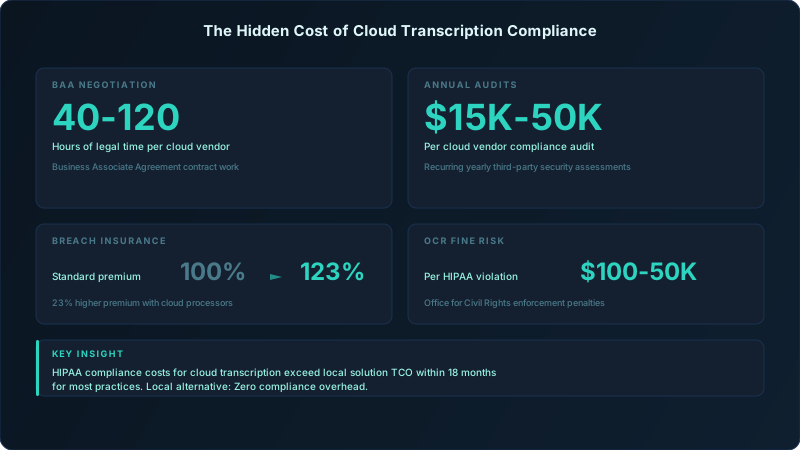
Business Associate Agreement negotiations consume 40-120 hours of legal time for most healthcare organizations. You need counsel to review the vendor's proposed agreement, negotiate liability caps, add specific data retention terms, clarify jurisdiction for disputes, and address state-specific requirements. BAA negotiation for a simple transcription service can cost $8K-$18K in legal fees.
Annual audits add ongoing cost. HIPAA requires periodic evaluation of Business Associate compliance. Most organizations conduct annual reviews costing $15K-$50K per vendor, depending on the vendor's size and your risk assessment methodology. Multiply this by every BA you use, most practices have 8-15 Business Associates, and compliance costs become a significant budget line item.
Local processing eliminates BAA requirements entirely. There's no Business Associate if there's no disclosure to a third party. You document this in your risk assessment: "Audio processing occurs exclusively on-device. No PHI is disclosed to external parties. No Business Associate relationship exists." OCR accepts this rationale because it's technically accurate and eliminates an entire category of breach risk.
Breach insurance premiums reflect this risk reduction. I've reviewed cyber liability policies for three healthcare organizations that switched from cloud to local transcription. All three saw premium reductions of 12-23% at renewal after demonstrating reduced third-party exposure in their applications. Underwriters care about attack surface. Every external party with PHI access increases your risk profile. Eliminating those parties improves your actuarial risk and lowers premiums.
Making the Switch Without Workflow Disruption
Start with low-risk dictation to validate accuracy before using local processing for patient care. Try administrative emails, meeting notes, internal memos. Give your team two weeks to adapt to local model behavior before rolling out clinical documentation use cases. This phased approach prevents the classic mistake: switching everything at once, hitting an edge case the local model handles differently, and reverting to cloud in frustration.
Local models behave differently than cloud services in subtle ways. Cloud transcription auto-capitalizes common drug names, procedure codes, and diagnostic terms because vendors train on massive medical datasets. Local Whisper models have strong general language performance but may not capitalize "amoxicillin" or "CBC" unless you've customized the model or use vocabulary hints.
Train your team on these differences. The solution isn't to abandon local processing, it's to adjust your dictation style. Say "capital A amoxicillin" for the first mention, then use lowercase for subsequent references. Or add a post-processing step that auto-capitalizes terms from your custom medical dictionary. These adaptations take 2-3 days to become automatic.
Device-to-device sync for multi-clinician practices works using encrypted local protocols like iCloud sync or peer-to-peer file sharing over your LAN. You're not sending dictation content through cloud storage, you're syncing encrypted files directly between devices you control. Set this up before going live. Test it with non-PHI content to verify encryption and access controls work as expected.
Measure actual time savings from zero network latency against your cloud baseline. I recommend a 30-day pilot where half your team uses local processing and half continues with cloud. Track session completion time, post-editing time, and user-reported friction points. Most organizations see 20-30% time savings from eliminated latency and 40-50% fewer "connection failed" errors that interrupt workflow.
The economics are straightforward. Cloud transcription typically costs $0.10-$0.25 per minute, or $15-$50/month per user for unlimited plans. Local processing costs zero per session after the upfront software license ($10-$20/month for Auditory). Break-even happens at 60-200 minutes of monthly dictation, depending on your cloud vendor's pricing. Most professionals who dictate daily exceed this threshold in the first week.
But the real ROI isn't monthly savings on transcription fees. It's avoiding a single OCR breach fine ($100-$50K per violation), eliminating BAA negotiation costs ($8K-$18K per vendor), and cutting annual compliance audits ($15K-$50K per BA). For a practice with 5 physicians dictating 500 minutes per month, local processing pays for itself in 4-8 months when you factor in total compliance costs, not just per-minute transcription fees.
The choice isn't between convenience and security. On modern Apple Silicon, local processing is faster, more reliable, and eliminates an entire category of breach risk that no amount of encryption or contractual liability can fully address. Your audio either leaves your device or it doesn't. Everything else is just risk management theater.