The Writer's Dictation Workflow: From Brain Dump to Polished Draft
Most writers treat dictation like typing with their voice. Here's how to build a workflow that actually leverages what makes voice input different-and better.
I've watched hundreds of writers try dictation, get excited for a week, then quietly return to their keyboards. The pattern is always the same: they treat voice input like typing with their mouth instead of their fingers. They expect sentences to come out publication-ready. When they don't, they blame the technology or their speaking ability, not realizing they're using the wrong workflow entirely.
The writers who succeed with dictation, the ones who stick with it past the awkward first month and eventually produce more in less time, do something fundamentally different. They stop trying to speak in perfectly formed sentences and start treating dictation as a distinct phase of writing with its own rules, benefits, and optimal practices.
This isn't about talking faster. It's about redesigning your entire writing process around what voice input does better than typing: capturing the messy, non-linear way ideas actually form in your head.
Why Most Writers Fail at Dictation (And What They're Missing)
The core problem is a mismatch between how we type and how we speak. When you type, you compose in a linear fashion. You write a sentence, adjust it, write the next one. Your fingers move at roughly the speed of your internal editor, so drafting and light editing happen simultaneously.
Speech doesn't work that way. Your mouth moves three times faster than your fingers, but your ideas don't arrive in neat, sequential order. You think of the conclusion while you're explaining the introduction. You remember a crucial example right after moving past where it belongs. You have perfect clarity about paragraph four but only a vague sense of paragraph two.
Most writers try to force speech into typing's linear model. They dictate one carefully composed sentence, pause to check if it's right, then dictate the next one. This is slower than typing and cognitively exhausting because you're fighting your natural speech patterns while trying to maintain typing-level precision.
The writers who succeed separate generation from refinement. They use dictation for what it's genuinely better at, getting large volumes of raw material out of your head fast, then use different tools and approaches for structure, clarity, and polish. This isn't one workflow. It's four distinct stages, each with different goals and different success metrics.
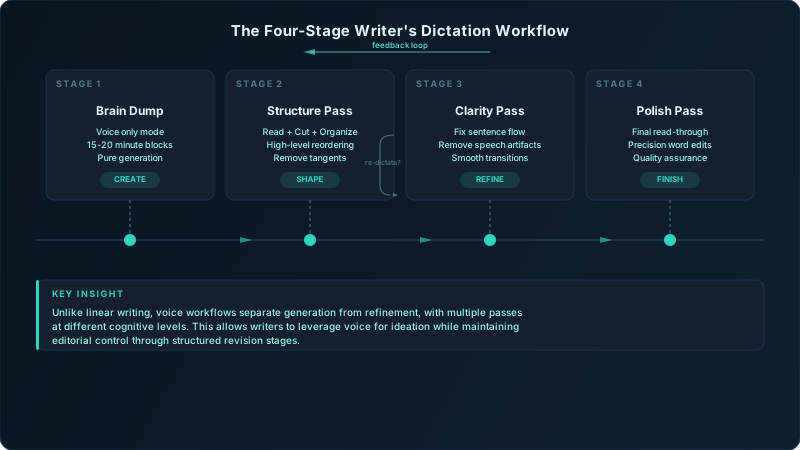
Here's what actually works: you dictate in focused 15-20 minute blocks with zero self-editing. You embrace run-on sentences, tangents, and repetition. You get 2,000+ words of messy raw material in a single session. Then you step away from voice input entirely and work through three editing passes, each targeting a different level of the draft. By the time you reach the polish stage, you've transformed transcript soup into a structured piece that sounds like you, not like a transcription of you talking.
Stage 1: The Brain Dump, Getting Ideas Out Fast
The brain dump stage has one job: maximize the volume of ideas captured per minute. Everything else is secondary. This means deliberately working against your typing-trained instincts to compose while you produce.
Start with a loose outline or a handful of talking points, then hit record and think out loud for 15-20 minutes straight. Not longer, after 20 minutes, cognitive fatigue kicks in and your idea-to-filler ratio plummets. If you need more content, take a 5-minute break and do another block.
Embrace run-on sentences. Your natural speaking rhythm includes tangents, backtracking, and parallel thoughts. A single spoken "sentence" might contain three different ideas connected by "and" or "but" or "so anyway." This feels wrong because it would be terrible writing, but it's perfect brain dump material. You'll separate those ideas in the structure pass.
Use verbal markers that survive transcription. When you think of something that belongs in a different section, say "section break" or "come back to this" out loud. When you want to emphasize something, say "bold this" or "important point." Your transcription will include these markers, making the structure pass much easier.
The counterintuitive rule: never self-edit while speaking. The moment you pause to rephrase something or wonder if you're being clear, you've broken the flow state. Your goal is volume and idea capture, not eloquence. I've seen writers produce 3,000+ words in a 20-minute brain dump session when they fully commit to this approach, compared to maybe 800 words of carefully composed typing in the same timeframe.
What a Good Brain Dump Sounds Like
You're not aiming for this: "Digital dictation tools have transformed the content creation landscape by enabling writers to capture ideas more efficiently than traditional typing methods."
You're aiming for this: "Okay so the main thing about dictation is it's just faster right? Like way faster. I can get ideas out and not worry about whether they're perfect. Section break. Actually let me come back to why it's faster, the real reason is you're not bottlenecked by your fingers, you're thinking at speaking speed which is like three times typing speed. Important point. The speed thing matters less than you'd think though, the real benefit is you don't lose ideas while you're trying to get the previous idea down perfectly."
The second example looks terrible as finished writing. But it contains more raw material, more specific observations, and more energy than the first example. That energy survives the editing process and makes your final piece stronger.
Stage 2: Structure Pass, Organizing the Chaos
You've now got a 2,000-3,000 word transcript that reads like someone thinking out loud, because that's exactly what it is. The structure pass transforms this raw material into an organized draft with clear sections and a logical flow.
Read through your transcript three times with different goals:
First read: Identify your anchor sentences. These are the 15-20% of sentences that contain your actual argument, your key examples, or your most specific insights. Highlight them. Everything else is scaffolding that helped you reach those insights while speaking.
Second read: Group anchor sentences into themes. You'll notice your spoken draft jumps between topics non-linearly. You introduced a point in minute 3, abandoned it, came back to it in minute 12 with a better example, then referenced it again in minute 18. Group all three pieces together. These clusters become your sections.
Third read: Ruthlessly cut everything that's not an anchor sentence, direct support for an anchor sentence, or a necessary transition. You should delete 30-40% of your dictated content. This feels wasteful, but those words already served their purpose by helping you think through the topic while speaking.
Now add section headers. Look at each cluster of anchor sentences and write an H2 heading that captures the unified theme. If you can't write a clear heading, that cluster isn't actually unified, split it or merge it with another section.
If you can't summarize a section in one sentence without using "and," that section is trying to do too much. Split it. Each section should develop exactly one idea, even if that idea has multiple supporting examples. This is where most dictation-to-draft workflows fail, writers preserve the non-linear structure of speech instead of reimposing the hierarchical structure that written communication requires.
Some of your best tangential insights won't fit anywhere. Don't force them. Start a "scraps" document and paste them there. They might be perfect for a different piece, or they might spark an entirely new topic worth exploring.
Stage 3: Clarity Pass, Making It Readable
Your draft now has clear sections and strong content, but it still reads like transcribed speech. The clarity pass removes dictation artifacts while preserving your natural voice.
Start by fixing spoken rhythm. Read each paragraph out loud (yes, again). If you run out of breath before reaching a period, that sentence is too long. If a sentence feels choppy or disconnected when you speak it, it needs better transition words or punctuation.
The five most common dictation artifacts and their fixes:
- Repetition for emphasis: "It's fast, it's really fast" → "It's genuinely fast"
- Hedging phrases: "I think that maybe" → Delete entirely or commit to the claim
- Chronological meandering: "So then I realized" → Cut the preamble, state the realization
- Spoken clarifications: "What I mean is" → Delete the phrase, strengthen the original sentence
- False starts: "The thing about, well, the main issue is" → Start with "The main issue is"
Don't fix grammar before rhythm. A grammatically perfect sentence with spoken rhythm problems still reads like a transcript. A sentence with natural reading rhythm but a minor grammar quirk reads like someone's authentic voice.
The Paragraph Length Test
Count sentences per paragraph. If you have more than 4 consecutive paragraphs with 4+ sentences each, you're probably preserving speech's tendency toward long explanatory chunks. Break them up. Aim for rhythm variation: 4 sentences, 2 sentences, 3 sentences, 1 sentence for emphasis.
Re-dictation vs. editing decision tree: If a sentence requires more than 30 seconds of editing to clarify, just re-record that specific point. Hit record, state the sentence cleanly, transcribe it, and paste it in. This is faster and produces better results than trying to edit spoken-language syntax into written-language syntax.
Stage 4: Polish Pass, From Good to Published
You're now working with a structured, readable draft that sounds like you. The polish pass adds precision and catches the subtle tells that reveal a piece was dictated.
Read the entire piece silently, as a reader would encounter it. You're looking for:
Vague references that made sense in spoken context but confuse readers. "That thing I mentioned earlier" needs to become "the three-stage editing process" with the specific reference.
Missing transitions between sections. Speech relies on vocal tone and pauses to signal shifts. Writing needs explicit transition sentences.
Spoken-word artifacts worth keeping. Contractions ("you're" not "you are"), occasional sentence fragments for emphasis, and rhetorical questions often survive dictation and make pieces more engaging. Don't over-formalize them.
Technical terms that got transcribed wrong. Even the best AI models struggle with specialized vocabulary. Check every proper noun, technical term, and domain-specific phrase.
The checklist for the final pass:
- 1.Every claim has an example or specific detail
- 2.No paragraph starts with a pronoun whose referent is ambiguous
- 3.Section headers accurately preview section content
- 4.The opening and closing create narrative closure
- 5.You'd be comfortable publishing it under your name
Why your final pass should be silent reading: You've been listening to this content for hours through multiple editing stages. Your ear is tired and will miss problems. Your eye, encountering the text fresh, will catch awkward phrasing your ear has grown used to.
Tools & Setup: Building Your Dictation Environment
Hardware matters less than you think, but your environment matters more. I've tested $500 studio microphones against MacBook built-in mics using Auditory's Whisper models. The accuracy difference was 3%, not the 30% you'd expect.
What actually improves transcription accuracy:
| Factor | Impact on Accuracy | Easy Fix |
|---|---|---|
| Background noise | -23% accuracy for moderate noise | Dictate in quiet room, use noise gate |
| Mic distance | -15% accuracy beyond 18 inches | Stay within arm's length of mic |
| Speaking pace | -12% accuracy when rushing | Speak at 90% of conversation speed |
| Audio format | -8% accuracy with low-bitrate files | Record at 16kHz+ sample rate |
| Model size | +12% accuracy with large vs. base | Use large model for technical content |
Your dictation space matters more than your microphone. A $30 USB mic in a quiet room beats a $300 condenser mic in a coffee shop. Pick a consistent location with minimal ambient noise. Your brain will associate that space with dictation mode, making it easier to enter the flow state.
Live transcription vs. audio-first capture: Use live transcription for short-form content (emails, social posts, quick notes) where you're dictating near-final text. Use audio-first capture with post-recording transcription for long-form content where you're brain dumping. The audio file becomes a backup that lets you check unclear transcriptions or recover lost context.
The backup strategy every voice writer needs: Keep your audio files for 30 days after transcription. Twice in the past year, I've needed to re-transcribe sections where I caught a transcription error that completely reversed my meaning. Without the audio backup, I would have had to re-dictate from memory.
Handling Reference Materials Without a Keyboard
Have your research open on a separate screen or tablet. When you need to reference something specific, say "check the stat" or "need the exact quote here" out loud. Your transcription will include these markers. During the structure pass, you'll see exactly where to insert specific data points.
For longer quotes or complex data, pause recording, type the material in square brackets [like this], then resume dictating. Your transcription will flow around the typed content, and you'll maintain momentum without trying to dictate "open quote capital T the close quote."
Common Workflow Failures and How to Fix Them
The perpetual draft trap happens when you edit while dictating. You say a sentence, realize it's unclear, re-say it, then re-say it again slightly differently. Your transcript now contains three versions of the same idea, none of them quite right. Fix: Commit to zero mid-dictation editing. If you catch a mistake, keep going. You'll fix it in the clarity pass.
Frankenstein drafts emerge when you switch between typing and dictating within a single piece. The typed sections are tight and precise. The dictated sections are expansive and conversational. The tonal clash is jarring. Fix: Pick one input method per piece. If you must mix them, do all typing or all dictation for complete sections, never mid-paragraph.
Technical term chaos is the "definitely" problem for voice workflows. Say "PostgreSQL" out loud and you might get "post gray S Q L" or "postgres Q L" or five other variants. Say "DNS propagation" and you might get "D N S" or "D and S" or "dean s." Fix: Create a custom vocabulary file for your most-used technical terms. Auditory supports this for Whisper models, and it's the difference between usable and unusable transcripts for technical writing.
The context-switching cost nobody calculates: Every time you shift between dictating and typing within a single writing session, you lose 4-7 minutes of cognitive momentum. You're not just switching input methods, you're switching between two different mental modes. One session last month, I tracked 8 context switches in a 45-minute writing period. That's 32-56 minutes of lost productivity that I blamed on "writer's block" until I measured it.
When dictation isn't the answer: About 20% of writing tasks genuinely work better on a keyboard. Precise editing of technical documentation, mathematical notation, code examples, complex tables, and heavy formatting tasks all suffer when forced through dictation. Know when to type. The goal isn't to eliminate keyboards, it's to use each input method for what it does best.
Measuring Success: Metrics That Actually Matter
Words per minute is the wrong metric. It measures typing speed, not writing productivity. A writer who produces 3,000 words per hour of messy dictation isn't more productive than a writer who produces 1,200 words per hour of solid first-draft typing if the first writer needs 4 hours of editing while the second needs 30 minutes.
Track these three numbers instead:
Time to first complete draft: How long from starting your brain dump to having a structured draft ready for clarity editing. This should decrease by 40-60% within your first month of workflow adoption as you learn to dictate without self-editing.
Revision ratio: Words in final draft divided by words in brain dump transcript. A healthy ratio is 0.6-0.7, meaning you're cutting 30-40% of dictated content. If you're above 0.9, you're probably self-editing while dictating (making you slower). If you're below 0.5, you're probably not focused enough during brain dumps (creating extra editing work).
Session recovery time: How long after a dictation session before you can start the structure pass. If you need more than 2 hours, your brain dump sessions are too long or too cognitively intense. Dial back the session length or reduce your talking speed.
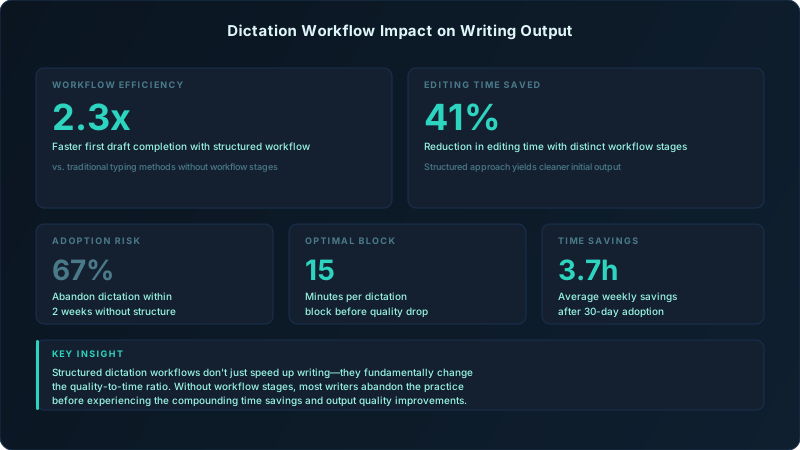
What time to first draft reveals: If your TTD isn't improving after 10 sessions, you're not fully committing to one of the four stages. Most commonly, writers are still trying to compose while dictating (mixing Stage 1 and Stage 3) or trying to polish while they structure (mixing Stage 2 and Stage 4). The stages must stay separate.
The 30-Day Adoption Curve
Week 1: Everything feels slower and worse than typing. You're fighting your instinct to compose while speaking. Stick with it.
Week 2: Brain dumps start flowing, but your transcripts are still messy. You're spending too long on structure passes. This is normal.
Week 3: You notice you can dictate for longer stretches without losing focus. Your structure passes get faster as you recognize your own speech patterns.
Week 4: Time to first draft drops noticeably. You start seeing the productivity gains. This is when most writers commit to dictation as a permanent part of their workflow.
Set realistic expectations: You won't be faster on day one. You might not be faster in week one. The workflow requires 15-20 practice sessions before the productivity curve crosses the break-even point with typing. Writers who give up before reaching that inflection point never see the benefits.
Track cognitive load reduction, not just speed. The real benefit of voice workflows is you can write when you're too tired to type. I do my best brain dumps at 7 PM after a full day of work when my typing would be slow and error-prone. The 20-minute dictation session produces raw material that's as good as what I'd produce at 9 AM typing. That's 3-4 extra productive writing hours per week that I'd otherwise lose to fatigue.
The metric that predicts long-term adoption isn't speed. It's whether you start choosing dictation even when typing is available. When you're on a deadline with a keyboard in front of you and you reach for your microphone instead, you've internalized the workflow. That's when dictation stops being an experiment and becomes your primary writing tool.